






stepdaddy20
gerardo1moncada1
bokiwiepls

VoidLies418

Rnxr

CeeeSevennn

Xero-Bunny
hymnert
rikuspirit2012
LaProEnDA

tomakun123
OglendH
Miles-Johnston

Lina-Tsu

theirison

DanielaUhlig
Yoann-Lossel
Random-Acts-Stock

AdorkaStock
Charlie-Bowater

laverinne

TutorialCafe

MichelleHoefener

jjlovely

DigitalArtTutorial

Tutorialised

TutorialsClub
Collection
Favourites















Deviation Spotlight






natasha2808 is not a Group Admin yet
Groups they admin or create will appear here
Artist // Student // Digital Art
- Jan 9, 1993
- United States
- Deviant for 11 years
- neonresidue.com
- She / Her
Badges


Favourite Visual Artist
Salvador Dali, Magritte, Andy Warhol
Favourite Movies
Requiem for a Dream, Blood Diamond
Favourite TV Shows
House, Spongebob Squarepants
Favourite Bands / Musical Artists
Avicii, Sander van Doorn, Armin van Buren, Deadmau5, Swedish House Mafia, Coldplay, Nero, David Guetta, My Chemical Romance, 30STM, All Time Low
Favourite Books
Anna Karenina, Antony and Cleopatra, Cat's Cradle, 1984
Favourite Writers
Leo Tolstoy, Kurt Vonnegut, George Orwell
Tools of the Trade
Wacom Intuos Table 9X12, Adobe Creative Cloud CS6
Other Interests
House Music, Fashion
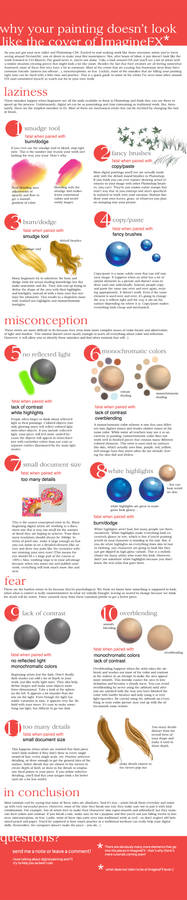
Common Digital Painting Mistakes FAQ
0 min read
Hi everyone! I'm so happy so many of you enjoyed my tutorial!
:thumb306838986:
Thank you for all your +favs and comments -- it's been awesome :). A lot people have been asking similar questions which weren't answered in the original tutorial. Here's some FAQ that will hopefully clear things up:
1. How do you do this in Paint Tool SAI?
Unfortunately, I don't have Paint Tool SAI so I don't have an exact answer for this. However, I've heard that it's similar so you should be able to translate most of the Photoshop tips into SAI. Also, most of the tips are conceptual and function in traditional work as well as digital, so the program you are
Join the community to add your comment. Already a deviant? Log In
Profile Comments 36
Join the community to add your comment. Already a deviant? Log In

thanks for your tips. it really helped me

We would love to have you on our website, illustratedartwork.com/
We have competitions, facebook/site chat, education, and much more (We will be doing a digital magazine tournament system).
Hope to see you and your great work.
-TJFX
We have competitions, facebook/site chat, education, and much more (We will be doing a digital magazine tournament system).
Hope to see you and your great work.
-TJFX

Happy birthday!!! 
Happy Birthday 
Is this acount dead?
Hi! No it's not dead! I've just had a lot of school work (I'm an art major so projects everywhere). I hope that I'll be able to revive it over winter break.
:3 Thats nice to know! I also wanted to say that your tutorials were quite helpful to me thank you!